Implemnting Lookup Control
About Lookup Control
The Lookup control assists users search for data with which they need to associate.
For example, when creating a new contact, we need to need to associate it with a site to which this contact belongs.
The lookup button launches a search form which allows the user to select the relevant record that update the necessary values in the launching form.
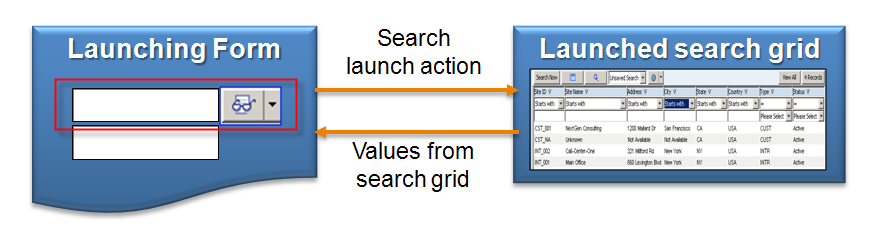
The lookup button is often used in create and edit forms, where the main focus object (in our above example – a new contact) needs to be related to another object (site in above example.
The Lookup control allows users to search and associate objects in the application. The control provides standard drop-down button functionality plus additional specific ones.
For the full discussion, see Implementing Lookup Control.
No comments yet.
About
Welcome to NextGen Consulting.
We provide IT consulting services to organizations that use either Microsoft Dynamics 365 or Amdocs CRM (or legacy Clarify) platforms.
Having over 17 years with full life cycle of CRM projects (Dynamics 365 / Power Apps, Amdocs CRM / Clarify), broad enterprise and telecom industry knowledge, in-depth experience with OSS / BSS, CRM, Service Assurance, Marketing and Sales business processes, we offer flexible variety of services aimed at both the telecom and the enterprise organizations such as:
- Provide complete turn-key solutions ( Amdocs Smart, Thin, Classic clients, Microsoft Dynamics CRM)
- Subcontract Design and development
- High level business design and documentation
- Detailed level technical design and documentation
- Develop design to a deliverable solution using agile methodologies
- Improve user experience (UI design and implementation)
- Design and Development Management
- Create user workshops for business analysis and requirements gathering
- Provide training for developers and business users
- Design complete solution architecture
- Inspect external provider deliverables
Our people have hands-on implementation expertise with implementing various business processes using rich selection of front end technologies such as Microsoft Dynamics CRM and Amdocs CRM (Smart Client, thin client, and Clarify Classic Client).
We can use this expertise to help your organization migrate existing legacy application to a newer platform, or simply provide any level of design (high level, low-level) and implementation to fit your organization needs.
Join our LinkedIn Smart Client Group to get immediate updates and share your ideas, needs and comments.
See more on Yuval Rashelbach.
For further information view profile at http://il.linkedin.com/in/yuvalr
or contact Yuval Rashelbach at yuval.rashelbach@nextgencon.com

 NextGen Consulting
Leave a comment