Role Base Authorization
Role Base Authorization (RBA) is a security feature for AmdocsCRM smart (and thin) client applications.
It facilitates the setup and administration of an organization’s authorization scheme, without requiring customizing the CRM applications. With RBA, it is possible to create a security model based on the organization’s structure so that the application can precisely apply security that reflects that model.
To implement security using RBA, certain areas of the Amdocs CRM applications functionality that require authorization need to be defined. Additionally, the organization model needs to be mapped to the AmdocsCRM applications. The organization model is built around what people do, their level of responsibility, the people they work with, the teams they belong to, and the business entities (accounts or cases for example) they work on. RBA collectively refers to these factors are as roles. A CRM application can be regarded as a combination of data and application functionally that enable accessing that data.
RBA allows managing the intersection between the roles that model the organization and the controlled data.
A simple RBA scenario defines roles which may roughly correspond to job descriptions, and each role is authorized to work with
different parts of an application.
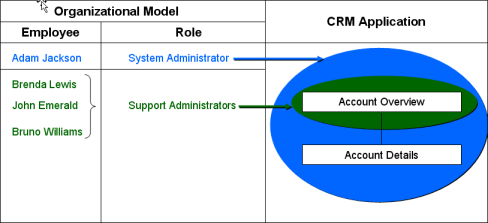
The figure shows four employees organized into two roles – Account Administrator and Support Administrator.
The Account Administrator role is authorized to work on everything related to Accounts, while the Support Administrator role is authorized to work only on Account Overviews.
The advantage of using such Roles to define authorizations is when the organization policy changes, only the authorizations associated with the roles will be changed, and no change at every user level will be necessary.
Roles are organized into 3 categories:
- Global roles provide authorization that spans an entire organization.
They are equivalent to Privilege Classes used in Classic Client, but a same user may have several global roles and only one Privilege Class
Global roles are used to authorize access to similar instances of work. You can for example authorize or disable access to all accounts, without specifying which account.
Global roles are mostly recommended to use. Using Global roles creates the most efficient database queries, hence result with best performance.
- Team roles associate a group of individuals to a business entity, such as an account or an opportunity.
Team roles can be used to authorize access to a specific instance of work that a selected group of people can work on.
For example, for sales operations it is common to form teams of people and assign them to work with particular accounts, or within particular territories, or on specific opportunities.
Using Team Roles, it is then possible to authorize access to those specifics accounts, territories, and opportunities only to the team members of those entities.
Team Roles are always defined against a domain object, which is the CRM database object representing the data to control, such as account (bus_org), opportunity or territory.
- User roles refer to special relationships between a user and an object of the application. For example, the Case Owner.
User roles can be used very much like team roles, to authorize specific instances of work for selected users. With user roles the implementor needs to identify existing relation between a user and an object instance (established by the application logic) and give it a name. When RBA is used to identify a relation, authorization can be applied to it as well as to any other related objects
When RBA checks to see if a logged-on user is authorized to perform a particular task or to access some data, it checks if the user has a global role, team role, or user role that grants permission to perform the task.
Multiple roles usage
The following figure shows a global role and an example of teams that are authorized to work on the same types of data, but only on the specific instances of that data for which their team is responsible for.
Global and Team Roles Authorization in RBA 
The diagram above show two account teams: East Region Account Team and West Region Account Team.
Account Administrator role held by John Stevens is authorized to see all accounts.Each team has assigned employees and two associated roles (Account Manager role and Sales Representative role).
East Region Account team is authorized to work only on the East Region Accounts, while the West Region Account Team is authorized to work only on the West Region Accounts.
The boundaries indicate scope of authorization for each role within the team (depends on team role)
Using RBA in the API (Application Programming Interface)
RBA can be used to control user interface (UI) elements for Thin client or Smart Client applications.
Using RBA, various types of UI controls such as buttons, menu items, text boxes, tabs, etc can be selectively enabled or disabled, made visible or invisible, based on the user roles. dditionally, the data shown as a search result can be filtered. Because RBA can be set up to give different permissions to different instances of data, certain user might sometimes see different UI controls on the same page, as different data are being worked on. For example, a user with permission to work on Corporate Accounts might see buttons enabled on Account Overview pages for Corporate Accounts and not on others, based on his roles and permissions.
AmdocsCRM Releases: From Clarify 11.5 to AmdocsCRM 8.x
Q: Right now I’m working on Clarify thick Client 11.5.
I need information like what are new versions available (details on new versions of thick, thin and smart clients) and nomenclature followed to represent a specific version of Client.
How are they differentiated from architecture point of view? Where can I get more information of current updates, releases, versions of Amdocs Client?
If we upgrade from thick to thin or smart client what parameters must be considered like DB used, version of DB and all.
Amdocs CRM Releases
Since Clarify version 11.5, the following versions were introduced: ClarifyCRM 12.1, ClarifyCRM 12.5 and ClarifyCRM 13.1.
As of ClarifyCRM 13.1, Amdocs changed its name and number to AmdocsCRM 6.0. (That means – both Clarify version 13.1 and AmdocsCRM 6.0 refer to the same release).
AmdocsCRM 6.0 (Clarify 13.1) was the last version to introduce new functionality for Thin (Web) client).
AmdocsCRM 7.1 was the first release that offered Smart Client (Java based client).
However, the first fully matured Smart Client was released on release 7.5 (Italy).
The following versions are currently available:
- AmdocsCRM 7.5.2 Supported clients: Thin (Web) and Smart Client (JNLP)
- AmdocsCRM 8.0 Supported clients: Thin (Web) and Smart Client (JNLP)
As of release 7.5.2, a multi language support was added on the database (Oracle) level. This is not supported by classic client.
Note that since version 11.5 the Classic client releases have not added new functionality provided in both Thin and Smart Clients.
For example, the Customer Interaction Manager (CIM) module (call center agent’s main screens) is not provided out of the box classic client.
Architecturally, Classic client is a fat client which connects either directly to the database (2 tier) or use Tuxedo as an intermediate layer (3 Tier). In both cases, all logic is performed mostly on the client using a Visual Basic 5.0 dialect named ‘ClearBasic’.
Thin client and Smart Client use Java J2EE architecture. This architecture separates the application logic between a server side code (implemented as Java Beans) and client side, implemented as JSP / JavaScript for thin client, and as Java / SWING code for smart client.
Supported Platforms:
Server Platform Support
Operating System
- Solaris 10 patch level: Generic_120011-14 (Sep 07)
- Win 2003 SP2 current patch
- HPUX 11iV2 RISC & HPUX 11iV2 Itanium
- AIX 5.3 TL06 SP1 Patch level: 5300-07-02-0000 (Feb 08)
Database
- Oracle 10gR2 10.2.0.3
- MSSQL Server 2005 SP2 Standard J2EE Server.
JVM/SDK Solaris:
- WebLogic 9.2 MP1 with Sun Java 2 SDK 5.0 update 12 with the Java HotSpot Client and Server VMs (32-bit)
- WebLogic 9.2 MP1 with Sun Java 2 SDK 1.5
- HP: WebLogic 9.2 MP1 with HPUX SDK 5.0.08 (32-bit) with Java HotSpot Server VM.
- IBM: WebLogic 9.2 MP3 with IBM SDK 5.0 SR5a 32-bit JavaTM.
- IBM: WebSphere 6.1.0.9 with IBM 32-bit SDK for Solaris, Java 2 Technology Edition, Version 1.5.
- IBM: WebSphere 6.1.0.9 with IBM 32-bit SDK, Java 2 Technology Edition, v1.5.
- IBM: WebSphere 6.1.0.9 with HP SDK for J2SE
Client Platform Support
- Classic Client: Windows Pro XP SP2 & Vista Business Edition
- Thin Client: Windows Pro XP SP2 & Vista Business Edition
- Smart Client: Windows Pro XP SP2 & Vista Business Edition
Browser
- Classic: N/A
- Thin: Internet Explorer 7
- Smart: N/A
- JRE Classic, Thin, Smart: 1.5_12
Upgrading from Classic 11.5 to Smart 8.0
For this upgrade you need to consider the following:
- Upgrading your current database to Oracle 10gR2 10.2.0.3 (AmdocsCRM 7.5) or Oracle 11g (AmdocsCRM 8.0).
This might require possible changes in your data model (for example, moving from ClearCallCenter or ClearSupport modules to the newer Customer Integration Manager data model).
- Migrating your application logic from Classic Client to Smart Client.
This requires updating your customized UI from VB to Smart Client SWING, and updating logic from ClearBasic to Java server side and client side.
Q: This information is very informative. I do have one somewhat related question on this (note – I’m not very technical on Amdocs CRM):
Since the older version of Clarify 11.x (or AmdocsCRM 6.x) and the latest 8.x version, how much has the underlying data model changed?
My understanding is that Amdocs has not been making significant data model changes (new or modified tables/columns)..etc. Is that true?
Secondly, what exactly (in summary) is this ‘ClearSupport modules’ to ‘Customer Integration Manager’ data model change that you mentioned?
Does Amdocs provide a good packaged upgrade path/solution to move to newer versions?
Thank you in advance.
More About AmdocsCRM Releases
AmdocsCRM 6.0 is the same release as ClarifyCRM 13.1 (not Clarify 11.x). Note that between releases 11.x and 13.1 there were several releases, the most significant one was ClarifyCRM 12.5.
Upgrade Path from Clarify 11.5 to AmdocsCRM 8.x
Q: Does Amdocs provide a good packaged upgrade path/solution to move to newer versions?
In order to upgrade from Clarify 11.5 to AmdocsCRM 7.x or 8.x you need to:
- Upgrade your existing database software from Oracle 8.X to Oracle 10gR2 10.2.0.3 (AmdocsCRM 7.x) or to Oracle 11 (AmdocsCRM 8.x).
- Migrate (upgrade) your database scheme (data model) from Clarify 11.5 to AmdocsCRM 7.5. via Clarify 12.5, AmdocsCRM 13.1 and AmdocsCRM 7.1 (full details are provided with each AmdocsCRM release notes which specify the exact migration path).
- Migrate your customized UI and logic (code) from ClearBasic to Java (server side and client side).
Technology Changes
Q: How much has the underlying data model changed from Clarify 11.x to AmdocsCRM 8?
The underlying data model has been significantly enhanced, both for the underlying technology and the provided functionality.
Technology Enhancements
New technical features were introduced to enhance performance, sizing etc.
Few Examples:
- Support larger number of unique records per database table. The old objid primary key mechanism now supports the full 32 bits.
- Additional key named GUID was added to support unique record string id.
- Search field object mechanism was added to enhance performance (the search field allows user defined pop-ups to use be used by reference, in similar fashion to application pop-ups, rather than by value.
- All popup menus are referenced by ref_id rather than by their nominated names.
- Multi-lingual support was added at the database level.
- Ability to define a schema object (table or view) using SQL query.
- The old data dictionary compiling application (ddcomp) was completely rewritten for a much more reliable java code and is now called Schema Manager.
- The licensing scheme was greatly enhanced. You need a proper Amdocs license in order for your J2EE server side code to properly run.
- Most importantly, the server side code exclusively use CBO (Crm Business Objects) to access the data in the database. These CBOs were upgraded to use JPOMS, replacing the old POMS.
- Clarify Process Manager (CPM) was replaced with Amdocs Process Manager (APM). APM provides much more sophisticated functionality, and can work with any other Amdocs products (it is largely used by Ordering).
- Smart Client technology now allows the front end UI to interact simultaneously with several backend applications.
For example: CRM and Ordering.
In other words: Both CRM and Ordering share e unified desktop front-end UI.
Note that until lately (version 7.5), most these changes impacted the new J2EE technology, but still allowed legacy Classic client to co-operate with the same database. However, Classic legacy code was not updated to take advantage of the newer enhancements.
Functional Enhancements
1. Billing Manager
Since Amdocs acquired Clarify, they decided that the Clarify UI (initially Classic, then Thin/Web, now Smart Client) to be used as a front end UI for all Amdocs Products.
Initially, main efforts were spent for adding UI screens and logic to provide seamless integration with billing functionality. (Billing Manager module, support Amdocs Billing or any other 3rd Party billing).
2. Customer Interaction Manager (CIM)
Although legacy Clarify provided a Call Center module (Clear Call Center), it appeared that the data mode used for CCC (Clear Call Center) was inefficient nor flexible (i.e. – it created a Case record for each interaction).
A completely new data model and supporting UI screens and logic were introduced. The CIM model creates a light Interaction record for each interaction with a customer.
An interaction is NOT a workflow object, but merely a data record that stores the following call related data: Title, Notes, Direction (outbound, inbound), Channel (800), Media (call, email, or chat).
Each Interaction is related to one or more TOPICS. A topic is an issue raised by the caller. Each topic is categorized by at least two call reasons (identifiers), a possible, not mandatory, linked related Workflow object (such as Case), and a result code.
In practice, each topic may potentially initiate a call center process, such as an Order.
One of the most important CIM features is the ability of the call center agent to handle several interactions simultaneously. Each interaction with a caller is identified by caller’s name. The agent can toggle among several on-line interactions (each has its own different caller) while holding the caller on the line. When switching from one interaction to another, all interaction related data and UI is automatically switched as well and exposed to the agent.
An interaction can be used with an Anonymous Caller as well.
3. Multi Media Integration
AmdocsCRM now supports a sophisticated integration module with external Interactive Voice Recognition (IVR) systems. It allows call center agents to accept calls, put calls on hold, transfer calls among them etc.
All IVR control is performed from the agent’s desktop. It also supports alternative media such as conducting a live chat etc.
The multimedia integration also allows passing IVR parameters automatically to the interaction screen.
4. Ordering Integration
As of release 7.5, ordering module UI and front end logic is integrated with CRM UI. It is possible to initiate an order process directly from CRM interaction screen with a single button click.
5. Enhanced Support Module
There were many enhancements to the support module here is one of them:
SLA (Service Level Agreement) Manager
Tracking service level agreements (more on this in a separate post).
Role Based Authorization (RBA)
Control UI and backend permitted user activities according to their Global, Group or User Roles.(See more on this in Role Based Authorization).
Case Types
Case types are not only 3 keyword identifiers stored with a case record, but a whole definition which allows different screens to popup according to the type of the case.
Summary
Yes – in order to support all above changes (and many, many more) Amdocs have added significant enhancements to the underlying data model.
ClearSupport Vs Customer Interaction Manager
The ‘ClearSupport’ module is a separate module from ‘Customer Integration Manager ‘(CIM). They use completely different (although compatible) data models.
You should regard the Customer Interaction Manager module as an enhancement to the Support module.
From business process perspective, any customer call starts with the ‘Customer Interaction Manager’ to handle the call (interaction).
An interaction may, or may not, propagate to a process handled by the Support module (i.e. a service call).
For example – if a customer calls to ask a question and immediately get an answer, only Interaction record needs to be created, no Case is created (this is sometimes called ‘Done in One’).
On the other hand, if a customer calls and complaints about a service, or a billing issue, where the issue can not be immediately resolved, a process needs to be initiated to handle the issue. A Case record is then created, and the Support module handles this Case according to its type until the issue is resolved and the Case is closed.
Amdocs Receives Highest Possible Overall Rating in BSS Market Report
Amdocs (NYSE: DOX), the leading provider of customer experience systems, has received the highest possible overall rating of “Very Strong” in Gartner’s business support systems (BSS) vendor evaluation. This was reported in the Gartner(1) Dataquest report published in December 2009 titled, “Dataquest Insight: Business Support System Market Overview and Strategic Scorecard for Vendors, 2009.”
In May 2009, Gartner ranked Amdocs as the worldwide market share leader in 2008 in the Telecommunications Software Management Systems marketplace, based on total revenue from BSS, operational support systems (OSS) and service delivery platforms (SDPs), in a report(2), titled, “Market Share: Telecom Operations Management Systems (BSS, OSS and SDP), Worldwide, 2006-2008.”
In January Amdocs announced the new version of its product portfolio – Amdocs CES 8 – the industry’s most comprehensive portfolio of customer experience systems (CES) spanning BSS, operational support systems (OSS) and network-connected service delivery platforms (SDP). New BSS products introduced can help service providers lower their operational costs and grow their business profitably as they launch new services include:
– Amdocs Convergent Charging (Turbo Charging) – A single, real-time charging product for both prepaid and postpaid services; set an industry record while measuring real-time charging for prepaid services on blade servers in a recent benchmark test that ran charging scenarios for 150 million subscribers, including 120 million prepaid subscribers, demonstrating the ability to process 276 million busy hour call attempts (BHCA) – executing 3,300 events per second per core; the product also supports the Linux/x86 operating system, and can run on multiple servers based on x86 processors;
– Amdocs Universal Storefront – Delivers one e-commerce experience for all goods and services – from devices and accessories to pricing plans, ring tones and video by hiding the complexity of service providers’ different offerings and configurations, allowing consumers to experience a familiar, simple shopping experience;
– Amdocs BSS Pack – Off-the-shelf solution for rapid, low-risk deployment, pre-packaging products, services and business processes for convergent charging (based on Amdocs’ Turbo Charging technology), ordering, CRM, self-service and a product catalog; can be deployed for trial within two weeks.
Amdocs also received the highest possible overall rating of “Very Strong” in Gartner’s OSS vendor evaluation. This was reported in the Gartner(3) Dataquest report published in January 2010 titled, “Dataquest Insight: Operations Support System Market Overview and Strategic Scorecard for Vendors, 2009.”
(1) Gartner: “Dataquest Insight: Business Support System Market Overview and Strategic Scorecard for Vendors, 2009” by Norbert J. Scholz, December 22, 2009.
(2) Gartner: “Market Share: Telecom Operations Management Systems (BSS, OSS and SDP), Worldwide, 2006-2008” by Martina Kurth, Norbert J. Scholz, Kamlesh Bhatia, May 5, 2009.
(3) Gartner: “Dataquest Insight: Operations Support System Market Overview and Strategic Scorecard for Vendors, 2009” Martina Kurth, January 13, 2010.
About
Welcome to NextGen Consulting.
We provide IT consulting services to organizations that use either Microsoft Dynamics 365 or Amdocs CRM (or legacy Clarify) platforms.
Having over 17 years with full life cycle of CRM projects (Dynamics 365 / Power Apps, Amdocs CRM / Clarify), broad enterprise and telecom industry knowledge, in-depth experience with OSS / BSS, CRM, Service Assurance, Marketing and Sales business processes, we offer flexible variety of services aimed at both the telecom and the enterprise organizations such as:
- Provide complete turn-key solutions ( Amdocs Smart, Thin, Classic clients, Microsoft Dynamics CRM)
- Subcontract Design and development
- High level business design and documentation
- Detailed level technical design and documentation
- Develop design to a deliverable solution using agile methodologies
- Improve user experience (UI design and implementation)
- Design and Development Management
- Create user workshops for business analysis and requirements gathering
- Provide training for developers and business users
- Design complete solution architecture
- Inspect external provider deliverables
Our people have hands-on implementation expertise with implementing various business processes using rich selection of front end technologies such as Microsoft Dynamics CRM and Amdocs CRM (Smart Client, thin client, and Clarify Classic Client).
We can use this expertise to help your organization migrate existing legacy application to a newer platform, or simply provide any level of design (high level, low-level) and implementation to fit your organization needs.
Join our LinkedIn Smart Client Group to get immediate updates and share your ideas, needs and comments.
See more on Yuval Rashelbach.
For further information view profile at http://il.linkedin.com/in/yuvalr
or contact Yuval Rashelbach at yuval.rashelbach@nextgencon.com

 NextGen Consulting